
Table of Contents
- Why Your Smart Lights Need a DMX Interface
- DMXSmartLink HUB Kits Compared: Specs, Pricing, and Best Use
- How to Patch Smart Lights into DMX: A Step-by-Step Walkthrough
- Which DMX Interface Should You Buy?
- Affordable DMX Lighting for Small Venues Without Sacrificing Reliability
- Latency, Firmware, and Signal Troubleshooting: What to Check Before Showtime
- Final Verdict: Start Your Free Trial and Test Before You Commit
- Frequently Asked Questions
Last Updated: September 8, 2026
Why Your Smart Lights Need a DMX Interface
A DMX interface is the link that translates the professional lighting control protocol (DMX512) into commands your consumer smart lights can understand (en.wikipedia.org). If you are a mobile DJ, church technical director, or live streamer who has tried to sync Govee lights with a lighting console, you already know the pain of juggling multiple apps mid-show. The solution is to buy a DMX interface that treats those smart fixtures as addressable units within your existing lighting software.
This guide from DMXSmartLink breaks down the hardware kits that make this possible, how to patch your lights, and which configuration fits your venue.
The core tension here is simple: consumer smart lights speak Wi-Fi and proprietary protocols, while professional rigs speak DMX over XLR cables. A DMX interface resolves that conflict through signal conversion, letting your console, whether it is Lightkey, QLC+, or grandMA, control every fixture from one unified dashboard. Below, we show you exactly how to choose and configure the right interface without learning a new programming language.
DMXSmartLink HUB Kits Compared: Specs, Pricing, and Best Use
DMXSmartLink offers three HUB kits that pair a pre-configured Raspberry Pi 5 with different USB-to-DMX interfaces, plus a software license that patches Govee and other smart lights as real DMX fixtures. The choice between them comes down to whether you need simple output or simultaneous input and output for console-driven shows.
| Kit | Price | DMX Interface | Input & Output | Best For |
|---|---|---|---|---|
| Output Kit (Basic) | $349.00 | 1x Open DMX (software-timed) | Output only | First-time users, small rooms |
| Pro Output Kit | $449.00 | 1x ENTTEC DMX USB Pro (hardware-timed) | Output only | Venues, churches, DJs |
| Pro Dual I/O Kit | $649.00 | 2x ENTTEC DMX USB Pro | Simultaneous I/O | Theaters, console-driven rigs |
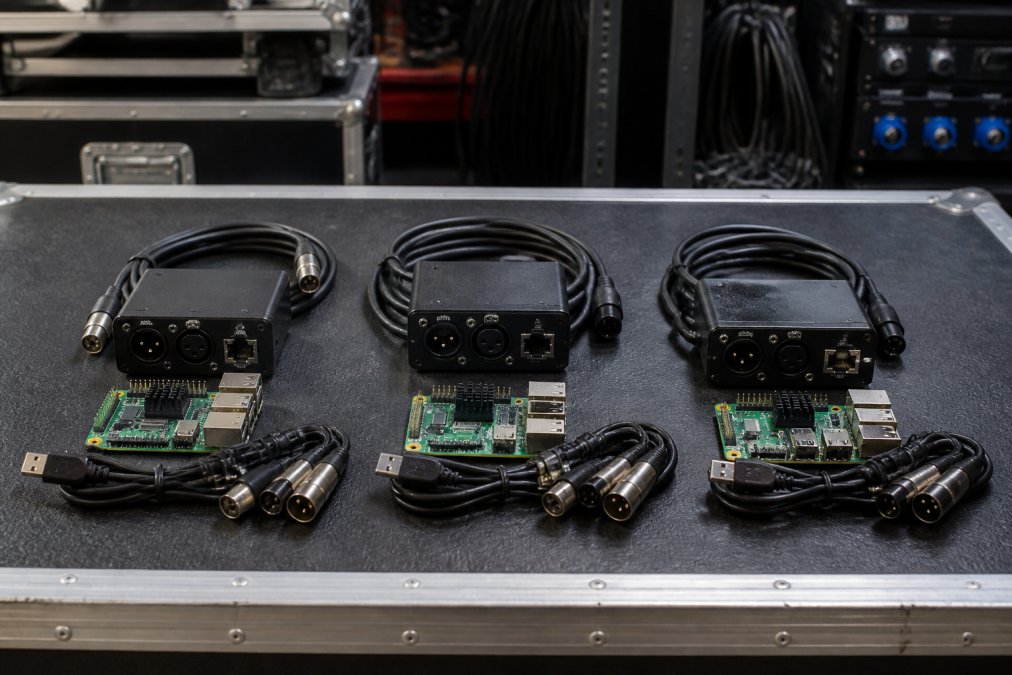
The Basic Output Kit at $349 is the entry point, built around an Open DMX compatible interface that is software-timed and non-isolated. It works for a few pars or uplights in a home studio, but it is not suitable for mission-critical live streams where reliability is paramount.

Stepping up to the Pro Output Kit at $449 swaps in the ENTTEC DMX USB Pro, which uses buffered, hardware-timed output. This kit delivers flicker-free control of demanding fixtures. The Pro Dual I/O Kit at $649 adds a second ENTTEC interface, enabling true simultaneous DMX input and output, which is essential when you need to capture a live feed from an existing lighting console and blend in smart lights.
How to Patch Smart Lights into DMX: A Step-by-Step Walkthrough
Patching smart lights into DMX is the process of assigning them a universe and channel range so your lighting software can address them like any other fixture. Start by connecting your HUB to the same network as your Govee lights, then open the web dashboard from any browser on that network.
- Put the HUB on Ethernet with a fixed IP address.
- Keep Govee lights on a solid 2.4 GHz Wi-Fi network.
- Open the DMXSmartLink web dashboard and confirm the HUB is detected.
- Add your Govee devices; the software handles device detection automatically.
- Assign each smart light a DMX address within your chosen universe.
- Save the configuration as a scene and test it from the visual control dashboard.
The software includes a fixture library, so many devices are recognized without manual configuration. For anything unusual, you can import profiles from QLC+ or the Open Fixture Library, which covers the long tail of consumer bulbs that lack native DMX support.
Which DMX Interface Should You Buy?
The best DMX interface for smart lights depends entirely on whether your show relies on a lighting console or runs from software on a laptop. If you are a DJ triggering scenes from a controller, the Pro Output Kit delivers the stable, hardware-timed signal you need to avoid dropouts during a live performance.
For churches and theaters where a technician runs a grandMA or similar console, the Pro Dual I/O Kit is the only option that captures DMX input while simultaneously outputting to your smart fixtures. A single USB-DMX device cannot do both at once, so buying the cheaper kit for a console-driven room will leave you unable to merge your existing rig with the new smart lights.
Affordable DMX Lighting for Small Venues Without Sacrificing Reliability
Small venues and mobile DJs often assume affordable DMX lighting means accepting flaky performance, but the real cost driver is the interface quality, not the lights themselves. You can keep your budget intact by pairing consumer smart lights with a reliable hardware-timed interface instead of upgrading to expensive professional fixtures.
The Pro Output Kit at $449 is the sweet spot for this use case (enttec.com). The ENTTEC DMX USB Pro provides the clocked, buffered output that prevents the flicker and signal dropout you get from cheaper software-timed adapters, while the HUB's unified dashboard eliminates the need for separate apps for each light brand.
A common mistake is buying a bare $29.99 OpenDMX interface to save money. That adapter is fine for hobby setups and static washes, but for a paid gig where reliability matters, a hardware-timed ENTTEC unit is recommended.
Latency, Firmware, and Signal Troubleshooting: What to Check Before Showtime
Latency is the enemy of any synchronized lighting show, and it usually appears when smart lights and DMX fixtures are not speaking the same timing language. Before showtime, verify that your HUB firmware is current and that your Govee lights are on a dedicated 2.4 GHz network, as a congested Wi-Fi channel introduces delay that no console can correct.
The DMXSmartLink HUB includes a visual control dashboard specifically for testing universes and patching before the audience arrives. Use it to confirm each fixture responds instantly to a manual fader move; if you see a lag of more than a fraction of a second, the issue is network congestion, not the interface.
For permanent installs, place the HUB on a fixed IP address and run Art-Net over a wired Ethernet connection rather than Wi-Fi. This eliminates the variable latency that plagues wireless setups and ensures your Art-Net protocol documentation maintains consistent synchronization across multiple universes.
Final Verdict: Start Your Free Trial and Test Before You Commit
Choosing the right DMX interface is not about picking the most expensive hardware; it is about matching the interface to your show's control architecture. For most DJs and small venues, the Pro Output Kit delivers the reliability you need without the cost of bidirectional capability, while theaters and churches with existing consoles should invest in the Pro Dual I/O Kit.

DMXSmartLink offers a free 14-day trial with no credit card required, so you can verify that the software patches your specific Govee models and integrates with your console before spending a dollar. The platform runs on Mac, PC, Pi, or Linux, supports Art-Net and sACN, and works with Lightkey, QLC+, and grandMA, making it a low-risk test for any production team.
Frequently Asked Questions
Can you control smart lights with a DMX controller?
Yes, but not directly. Smart lights like Govee use Wi-Fi or Bluetooth, not the DMX512 protocol. A interface, such as the DMXSmartLink HUB, receives the DMX signal from your controller or software and translates it into commands your smart lights understand. This lets your existing console treat a Govee strip like a standard DMX fixture, so you can trigger scenes, change colors, and sync effects without opening a separate app.
What is the difference between a standard DMX interface and a smart light link?
A standard DMX interface, like a USB-to-DMX adapter, sends a DMX512 signal over an XLR cable to professional fixtures. A smart light link does that and more: it also translates DMX data into the Wi-Fi or Bluetooth commands that consumer smart lights use. The DMXSmartLink HUB is a link. It outputs to traditional DMX fixtures through a USB interface and talks to Govee lights over your network, unifying both in one patch.
Is DMXSmartLink compatible with Lightkey and QLC+?
Yes. DMXSmartLink works with Lightkey, QLC+, grandMA, and any console or software that outputs Art-Net or sACN. You patch your Govee lights and DMX fixtures as you normally would in your software, then route the network signal to the HUB. The HUB handles the conversion. This means you keep your existing workflow and console, rather than learning a new interface.
What is the best DMX interface for small venues on a budget?
For small venues, the DMXSmartLink HUB Output Kit at $349 is the best value. It includes the HUB, software, and a USB-to-DMX interface, so you can control both smart lights and a few DMX pars. If you only need to control smart lights and already have an Art-Net node, the Network Edition costs less. For venues with a console feeding DMX in, the Pro Dual I/O Kit at $649 is the right choice.
The challenge is not finding smart lights that look good; it is controlling them with the precision your show demands. DMXSmartLink patches those lights as real DMX fixtures, giving you a unified dashboard and eliminating app fumbling mid-performance. Start the free trial, patch your rig, and confirm the reliability before you commit to a full purchase.
